
64 lines
2.6 KiB
Markdown
64 lines
2.6 KiB
Markdown
# A simple XML to JSON converter
|
|
|
|
[](https://www.npmjs.com/package/simple-xml-to-json)
|
|
[](https://github.com/nirgit/simple-xml-to-json/actions/workflows/node.js.yml)
|
|
[](https://codecov.io/gh/nirgit/simple-xml-to-json)
|
|
|
|
## Install
|
|
Simply install using NPM in your project directory
|
|
> npm install simple-xml-to-json
|
|
|
|
|
|
## Usage and API
|
|
### 1. convertXML(xmlToConvert [,customConverter])
|
|
* `xmlToConvert` \<string\>
|
|
* `customConverter` \<function\>
|
|
* Returns: \<JSON\> by default or other if `customConverter` is used
|
|
|
|
### 2. createAST(xmlToConvert)
|
|
* `xmlToConvert` \<string\>
|
|
* Returns: An AST representation of the XML \<JSON\>
|
|
|
|
Code Example:
|
|
```javascript
|
|
const {convertXML, createAST} = require("simple-xml-to-json")
|
|
|
|
const myJson = convertXML(myXMLString)
|
|
const myYaml = convertXML(myXMLString, yamlConverter)
|
|
const myAst = createAST(myXMLString)
|
|
````
|
|
|
|
---
|
|
###  Typescript compatible
|
|
---
|
|
|
|
## Notes and how to use code
|
|
1. The easiest thing to start is to run `node example/example.js` in your terminal and see what happens.
|
|
2. There's the `xmlToJson.js` file for convenience. Just pass in the XML as a String.
|
|
3. It's MIT licensed so you can do whatever :)
|
|
4. Profit
|
|
|
|
## How this works in a nutshell
|
|
1. The library converts the XML to an AST
|
|
2. There is a JSON converter that takes the AST and spits out a JSON
|
|
3. You can write your own converters if you need XML-to-ANY-OTHER-FORMAT
|
|
|
|
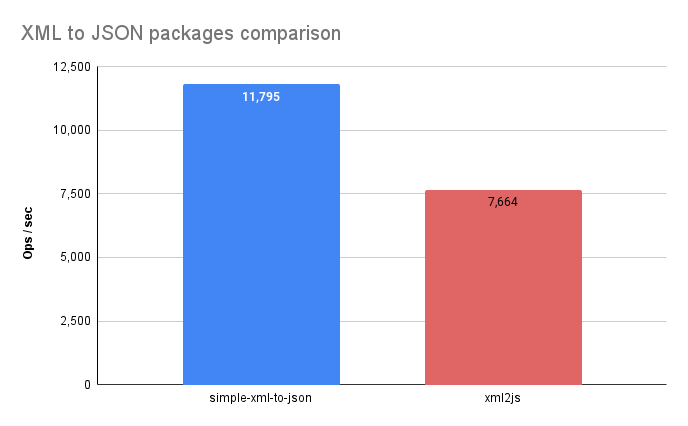
## Benchmark
|
|
|
|
_Take these results with a grain of salt._\
|
|
According to a __simple__ benchmark test I performed in __April 2024__ with a random XML. _YMMV_.
|
|
|
|
|
|
* The chart results __may be__ outdated. [Run the test yourself](https://runkit.com/nirgit/6620cf27943a41000847221d)
|
|
|
|
|
|
## Current Drawbacks
|
|
1. All values are translated to strings in JSON
|
|
2. There are currently reserved words in the JSON converter:
|
|
* "content"
|
|
* "children"
|
|
|
|
so you cannot by default have an attribute with that name and free text as the content of the element or have nested elements as children.
|
|
|
|
*If you need to, you can write your own converter from the AST created by the parser, and pass it as a 2nd parameter after the xml string*
|